 About gamma correction
About gamma correction
About gamma correction
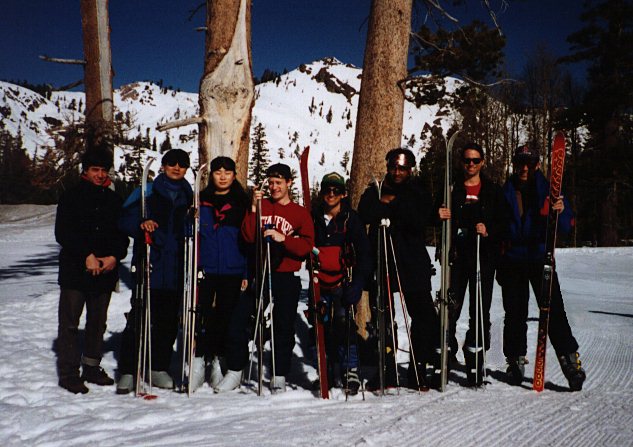
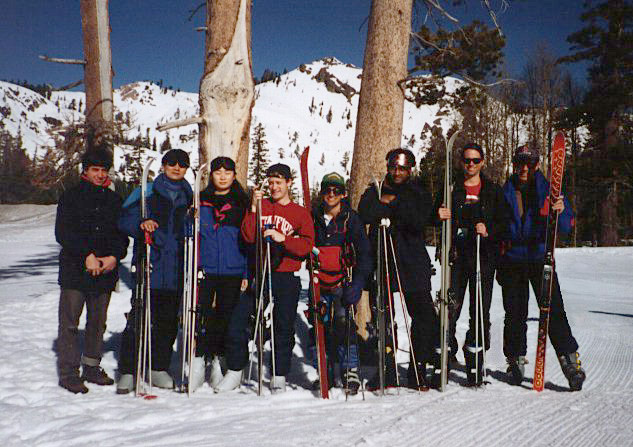
Who is responsible for applying gamma correction? If you are viewing these images on a Mac or Silicon Graphics (SGI) workstation (the latter is now obsolete), the operating system applies gamma correction for you by loading a colormap into the display hardware that recomputes pixel values on their way to the monitor using the second formula given above. In this case, our older images will look fine to you. If you are viewing these images on a Windows PC, then you must configure your video card, browser, or external image viewer application to apply gamma correction (see below for instructions). If your system cannot be configured to apply gamma correction, then you must download our images and correct them yourself, e.g. by applying the second formula in software. If you do none of these things, then our older images will look too dark to you.
How do I know if my system is applying gamma correction? Look at the two images above. The left image is not gamma corrected. It looks fine on an SGI, but too dark on a PC. In particular, on a PC the sky in the upper-right corner looks inky, almost as dark as the trees. The right image has been gamma corrected to 1.7. It looks fine on a PC, but washed out on an SGI - so washed out that you can see noise from this early-model digital camera in the black jackets. On a Mac, the story is somewhere between these two extremes.
How do I configure my system to apply gamma correction? If you have configured your browser to launch an external viewer like "xv" to display your images, you can ask it to apply gamma correction for you. For example, if your browser is Netscape Communicator (or more recently, Mozilla's Firefox), your image viewer is xv, and the gamma of your display monitor is 2.0, then you can ask xv to apply gamma correction as it displays an image by changing the invoking command in Netscape to "image/*; xv -gamma 2.0 %s". To find out the gamma of your monitor, look at the hardware specifications that you threw away on the day you unpacked the monitor. Some operating systems and programs provide an interactive utility to help you determine your monitor's gamma, typically by asking you to change the brightness of a gray patch until it matches an adjacent checkerboard of black and white squares that, if you squint to blur the checkerboard pattern, simulates a 50% gray. As mentioned earlier, most monitors have a gamma between 1.7 and 2.7. Fortunately, as monitors are replaced by LCDs, the world is slowly converging on a monitor gamma of 2.5.
I don't use an external viewer. What else can I do? If you use your browser to display images, rather than an external viewer application, there is currently, and unfortunately, no way to configure browsers to apply gamma correction. In that case, you'll have to change the gamma of your entire system. If you use a PC, the "Display" control panel may, for some video cards, allow you to reset your video card's gamma to compensate for your monitor. If you use a PC, Linux, and XFree86, it has a program called "xgamma" that will allow for XServer-wide adjustment. (Thanks to Seth Nickell for pointing this out.) If you use a Mac running OS 9, the Monitor control panel includes a way to set your display system's gamma. For Mac OS X, the Color branch of the Displays control panel will take you through a calibration procedure that lets you do this.
A subtlety: system gamma. Silicon Graphics workstation monitors have a gamma of 2.4, but they perform gamma correction as if the monitor had a gamma of 1.7. This yields a residual gamma (as seen on the monitor) of 2.4 / 1.7 = 1.4. This is called the system gamma, and it is intended to compensate for the fact that the images you are viewing typically represent brightly illuminated scenes, but you typically viewing them while seated in a dimly illuminated room, which changes the transfer characteristics of your eye.
Another subtlety: quantization spaces. Macs perform gamma correction, as already noted. However, Macs assume that the values you write into the frame buffer are not proportional to the intensity of the scene you are rendering, but rather to a non-linear power of that scene. Specifically, they assume pixel_value = scene_intensity^(1/1.8). Under this assumption, the gamma correction they need to apply just before the monitor merely needs to make up the difference between this space and a space that is gamma-corrected for the monitor. Assuming the monitor has a gamma of 2.5, their pre-monitor correction is thus displayed_intensity = pixel_value^(1.8/2.5). Actually, if you run the calibration procedure on a modern Mac, it will let you choose between 1.8 in the foregoing equation (for the Mac world) and 2.2 (for the PC world). Why the weird interpretation of frame buffer values? Because this non-linear space is closer to the way humans perceive brightness. In this space, quantization artifacts like banding are equally likely to be objectionable at the dark and light ends of the grayscale. In a space where frame buffer values are proportional to scene intensity, you'll see more banding of light objects than dark objects.
The real catch: uneven standards. After decades of chaos, there are now accepted standards ("color profiles") for embedding information into image files saying whether or not the image has been gamma-corrected, and for what value of gamma. Unfortunately, these profiles can only be embedded into certain kinds of files - for example JPG and TIF, but not GIF. Moreover, not all applications embed these profiles when they create image files, and not all applications know how to read embedded profiles. Without knowing whether a particular image contains a color profile, and whether a particular application is savvy to it, it's impossible to know whether or not you need to reset your display's gamma, and to what value. Even among images on a single web site, differing gammas may be present, depending on what system they were authored on. For example, we in the Stanford Computer Graphics Laboratory gradually moved from SGIs to PCs during 1995-2005, but we are now moving slowly to Macs. If we're working on the uncorrected display of a PC, our old SGI images look dark to us. If we're on the corrected display of a Mac, our old SGI images look fine to us, but our PC images look washed out. Worse, as we create new images, we are now unconsciously tuning them to include gamma correction so that they look acceptable on whatever machine we're on (PC or Mac). Even worse, if you use Macs, then Firefox and Safari perform gamma correction differently. Look for example at the two versions of buddhist monks in this Picasa Web Album.
How will it end? Fortunately (or unfortunately), PCs have (temporarily) taken over the world, including the world of high-performance 3D graphics. As they do, it becomes reasonably safe to assume that most people are looking at uncorrected displays. In this new world, images should be adjusted to include gamma correction. If you are a creator of images, and your tools are a digital camera and Photoshop, color profiles are correctly embedded and interpreted. If your tools are a 3D rendering program, then (depending on the program) you might be computing so-called linear-luminance images. These images need to be gamma corrected for display or they will look too dark. If you're on a Mac, and images produced by other people look washed out, crank up the room brightness a bit, thereby changing the adaptation of your eye, and they'll look better.
For more information. For a general introduction to the fascinating subject of gamma correction, refer to a computer graphics textbook such as Foley, van Dam, Feiner, and Hughes, Computer Graphics: Principles and Practice, second edition, Addison-Wesley. For a detailed treatment of gamma correction in broadcast television systems, see Pearson, D.E., Transmission and Display of Pictorial Information, Halsted Press, 1975. For more about gamma correction on computer displays, with particular attention paid to the Mac, see this great article by Charles Poynton on Gamma correction on the Apple Macintosh.