Room Controller
The room controller
is a java application which provides the user with a centralised controller
to open applications on machines in the workspace.
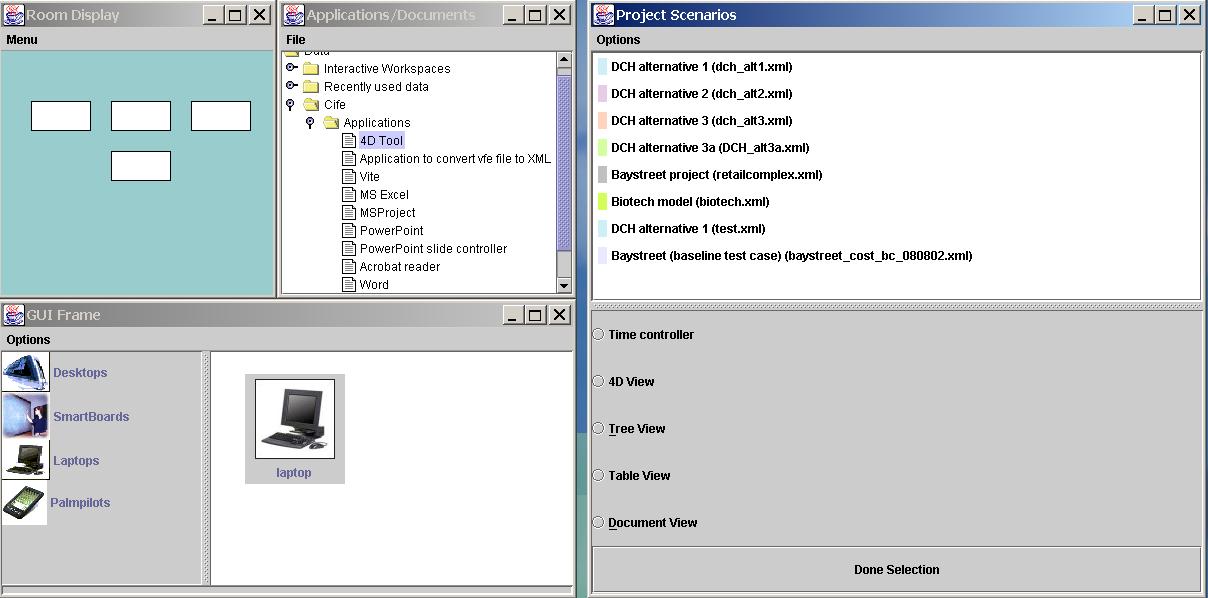
It contains 4 Panels
explained below:
The room controller
can be invoked as follows:
java roomConfig
[heapname] [server name] [location of room controller configuration XML file]
Example
of XML configuration file for room controller
Description of
Room configuration file
The structure of
the file is as follows:
- Roomcontroller
- Definitions
(defines the RGB values of the colors that are used in the file)
- Window (defines
the windows that come up when room controller started)
- X (x
coordinate where the window comes up on screen)
- Y (y
coordinate where the window comes up on screen)
- Name
(Defines the type of window that comes up. See below for the type
of windows in the current version of room controller)
- Title
(Title on the window that comes up)
- Visible
(Whether this window is visible or not. True/false value)
- Width
(width of window that comes up)
- Height
(height of window that comes up)
If window name
= WINDOW_roomdisplay then this is the window which defines the current room
configuration. It's elements / attributes besides the previous ones are:
- Window
- Bgcolor
(The background color of the room config window)
- Panel (Each
panel defines a iRoom machine)
- X (x coordinate
of the panel which describes the machine)
- Y (y coordinate
of the panel which describes the machine)
- Width (width
of the panel which describes the machine)
- Height (height
of the panel which describes the machine)
- Name (name
of the machine this panel describes in the iRoom space)
- Deviceid
(device id of the machine this panel describes in the iRoom space)
- Fillcolor
(color used to fill this panel on screen)
- Tooltip
(description which comes up when mouse moved to this panel)
If the window name
= WINDOW_tree then this describes the applications that can be opened in the
workspace (meeting agenda kind of thing). It's elements/ Attributes besides
the previous ones are:
- Window
- Tree (The
applications tree that comes up)
- Name
- File
(location of the XML file used to generate contents of this tree)
If the window name
= WINDOW_guiframe then this is the window which allows dynamic addition of device
icons in the room controller. Its attributes besides the previous ones are:
- Window
- Icons (location
of the directory where the icons for this window are stored)
If the window name
= WINDOW_queryframe then this is the window which gives a view of the contents
of the database and the ability to generate applications from data in the database.
Its attributes besides the previous ones are:
- Window
- Database
(location of database to connect to. This is an excelon database with
a web interface
Description
of file used for Document/ Application frame
- Iwroom
- Project
- Category
(Types of applications just a subcategory. Contains a sequence of applications)
- Name
(name of the category)
- Item
(Defines an application)
- Name
(name which is displayed in the tree)
- Data
(Actual executable associated with the application)
- Executable
(Currently need to be Explorer)
- Type
(Type of file that is opened with this application if any. Need
to specify the extension)